·  Gautham · YouTube Strategy · 19 min read
YouTube Channel Audit Checklist for Business Channels
A YouTube channel audit checklist for company channels: score your last 10 videos, read Studio like a buyer, and trace leads back to videos. Real scores inside.
A YouTube channel audit checklist for a business channel tests one thing: whether your videos can turn the right viewers into leads. It checks your titles against buyer searches, every place a viewer can take a next step, what YouTube Studio says about who watches, and whether any lead traces back to a video.
You have 40 videos. Views arrive every week. Ask sales which deals started on YouTube and nobody can name one.
This checklist closes that gap. It is written for company channels, where one customer matters more than any view count. Give it about an hour and you will know what is broken and what to fix first.
Key Takeaways
- A business channel audit asks whether videos reach buyers and give them a next step. Views and subscribers are inputs; leads are the verdict.
- Half of the audit uses public data anyone can score, including your competitors. The SellonTube channel audit scores that half for your last 10 videos.
- The other half needs your YouTube Studio and your CRM: search terms, retention, geography and leads per video.
- Six B2B channels that publicly credit YouTube for customers scored between 55 and 90 out of 100 on our audit. None scored below 40.
- Even a channel that brings in half of a company’s paid users has a weakest dimension. Fix your lowest score first.
Contents
- What is a YouTube channel audit for a business channel?
- The four parts of a business channel audit
- Part 1: score your last 10 videos
- Part 2: check every place a viewer can take the next step
- Part 3: read YouTube Studio like a buyer, not a creator
- Part 4: trace leads back to videos
- The business channel audit scorecard
- What to fix first: symptoms and likely causes
- Should you pay for a YouTube channel audit?
- FAQ
What is a YouTube channel audit for a business channel?
A YouTube channel audit is a structured review of a channel’s videos, packaging and data that finds what stops the channel from reaching its goal. For a business channel, that goal is customer acquisition, so the audit measures leads and buyer reach, not audience growth.
Most audit guides you will find are written for creators. They check subscriber growth, average view duration and thumbnail CTR, then tell you to post more often. Those checks still matter, but they answer a creator’s question: “how do I get more views?”
A business audit answers a different question: can this channel produce customers?
A YouTube channel audit for a business channel checks whether the channel can produce customers, in four parts. First, score the public metadata of your last 10 videos: do titles match what buyers search, do descriptions give a reason and a link to act, is publishing consistent, are chapters and playlists in place? Second, check every next-step surface: the channel page, pinned comments, end screens and the landing page each video sends people to. Third, read YouTube Studio for buyer signals: how much traffic comes from YouTube search, which search terms bring viewers, and whether the audience sits in the markets you sell to. Fourth, trace leads back to videos with tagged links, GA4 and a “how did you hear about us” field. Fix the weakest part first, because one broken step stops every lead behind it.
| Area | A creator audit asks | A business audit asks |
|---|---|---|
| Topics | Which topics get the most views? | Which topics do buyers search before they buy? |
| Titles | Does the title create curiosity? | Does the title match a query a buyer types? |
| Descriptions | Are keywords and hashtags present? | Do the opening lines give a reason and a tracked link to act? |
| CTR | Is CTR above the channel average? | Are the clicks coming from buyer searches? |
| Audience | Is the audience growing? | Does the audience sit in the markets you sell to? |
| Success | Subscribers and watch time | Leads and deals you can trace to a video |
The four parts of a business channel audit
A business channel audit has four parts, and only the first two use data anyone can see. That split decides how you run it. Parts 1 and 2 work on any public channel, so you can audit a competitor the same way, while Parts 3 and 4 need your own YouTube Studio and your CRM.
Run the parts in order. A broken title loses the buyer before any next step matters, and a missing next step makes lead tracing pointless.
Part 1: score your last 10 videos
Part 1 scores the public metadata of your 10 most recent videos on four checks. Use the last 10, not your best 10, because they show what your channel does now. Give each video a pass or fail on every check below.
1. Titles: would a buyer type this?
A title passes when it matches something your buyer would type into YouTube or Google before buying. It fails when it only makes sense to people who already know you, or when it sells curiosity instead of an answer.
Read each title and ask: who searches this, and are they ever going to pay us? Keep the main phrase in the first half of the title and the whole title under 60 characters, so it does not get cut off in search results.
Here is a real rewrite our audit suggested for a lead-generation channel in October 2026. “Why You Can’t Find Leads” became “B2B Lead Generation Mistakes: Why You Can’t Find Leads”.
The new title keeps the hook and adds a phrase a buyer searches. Our guide to YouTube titles for business has more patterns that work this way.
2. Descriptions: do the opening lines give a reason and a link?
A description passes when its first 150 characters say what the viewer gets and include a link to the next step. Viewers see only the opening lines before they tap “more”, so a link at the bottom of the description is a link most people never see.
Check three things in each description:
- The first sentence restates the video’s promise in plain words a buyer would use.
- One link appears in the opening lines, pointing to the page that continues the video’s topic.
- That link carries UTM tags, so a visit from it shows up in your analytics as YouTube. Part 4 covers the format.
3. Publishing consistency: are there gaps longer than a month?
A channel passes when its last 10 uploads have no gap longer than about 30 days. Long gaps are not a ranking penalty in themselves, but they usually mean videos ship when someone has spare time, and a channel run that way rarely builds a library around buyer questions.
Write down the upload date of each of the 10 videos and mark any gap over a month. If the gaps cluster, ask what broke: scripting, approvals or recording time.
4. Search packaging: chapters, playlists and tags
A video passes this check when it has chapters in the description, sits in at least one topic playlist, and uses a few tags that match the title’s main phrase. Chapters matter most for business videos because a buyer can jump straight to the part that answers their question.
Shorts fail this check by design. A Short cannot carry chapters, so a library that is mostly Shorts will score low here even when everything else is strong.
Doing this by hand gets slow fast.
Ten videos times four checks is 40 judgements. It takes about 45 minutes, and by video eight most people are scoring more generously than they did at video one. You also cannot repeat it next quarter and compare like with like.
The SellonTube channel audit scores your last 10 videos in about 20 seconds on the same four dimensions, 0 to 25 each. It also rates every title and description as good, fair or poor, and lists three fixes.
The audit reads only public data: titles, the first 200 characters of each description, upload dates and video length. It does not log in to your channel and cannot see analytics, so Parts 3 and 4 stay with you. You get 3 audits free, then it asks for a business email.
What a real audit looks like: Scalelist
Scalelist sells an AI sales-lead Chrome extension, and its founder says YouTube brings 50% of the company’s paid users. We featured it in our six B2B YouTube case studies. In October 2026 we ran its channel through the audit again.
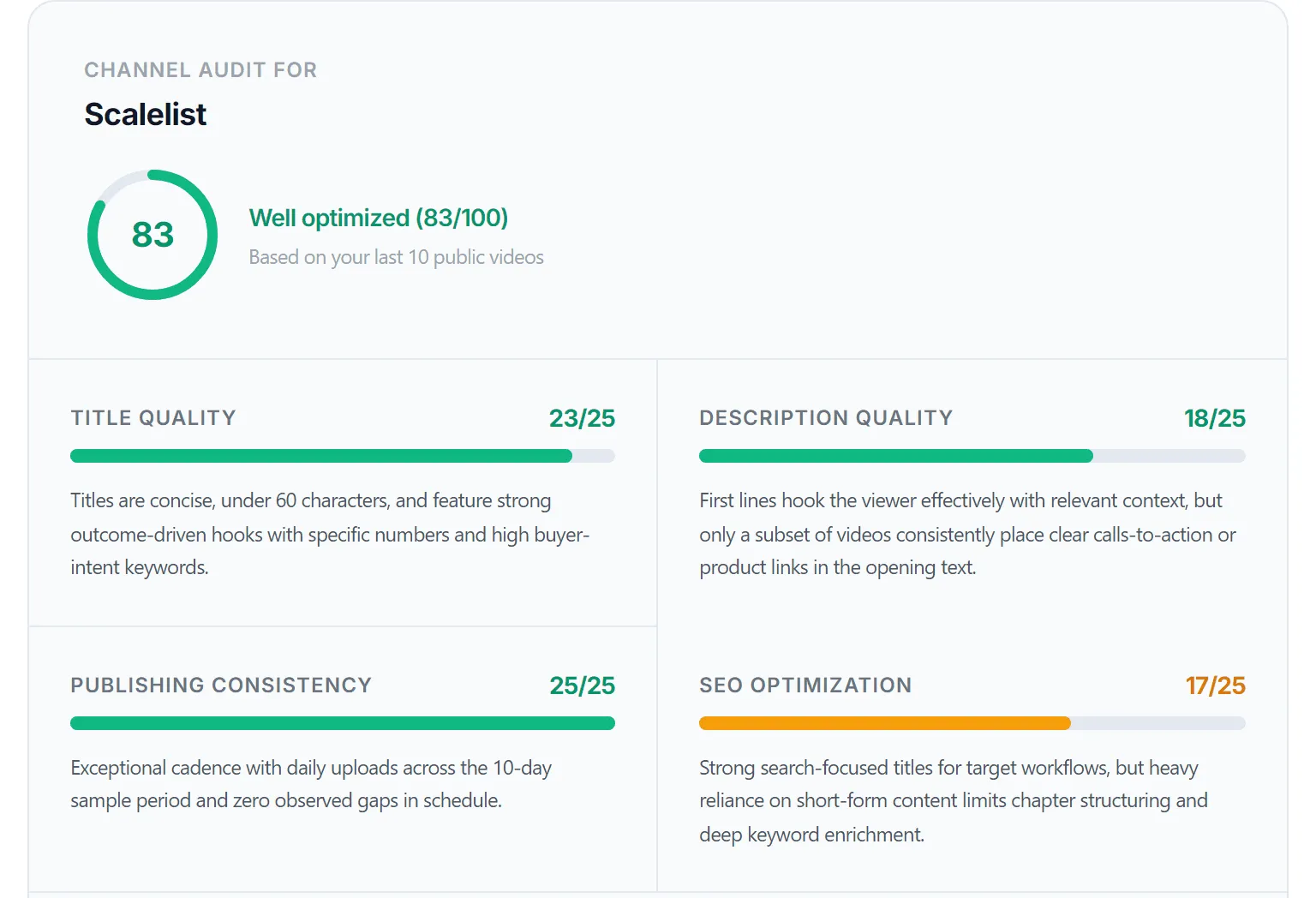
Scalelist’s channel audit result in October 2026: 83 out of 100. The video-by-video list and recommendations are cropped out.
The channel scored 83 out of 100. Publishing consistency was perfect at 25 out of 25, because it uploads daily. The weakest dimension was SEO optimization at 17, and the reason was structural: most of the recent uploads are Shorts, which cannot carry chapters.
Descriptions came second-weakest at 18. The audit’s first recommendation was to add a trackable link to Scalelist within the first 150 characters of every Short description. That fix targets leads directly.
But there’s a catch.
A channel that already brings in half of a company’s paid users still had a clear weakest dimension.
The six case-study channels scored between 55 and 90 when we audited them in July 2026, and none fell below 40. In the tool’s scoring bands, a score under 40 means buyers searching for what you sell are unlikely to find your videos at all.
Part 2: check every place a viewer can take the next step
Part 2 checks the next-step surfaces: every place a viewer who liked a video can move toward becoming a lead. A next-step surface is any spot on YouTube where a viewer can click from your video toward your business, such as a description link, pinned comment, end screen or channel page link.
Open your channel in a private browser window, as a stranger would see it, and check these five surfaces.
Channel page: does it say who the channel is for?
The channel page passes when the banner and the first line of the About section name the buyer and the problem. “Video tutorials for clinic managers who want fewer no-shows” passes. “Welcome to our official channel” fails, because it says nothing a buyer can match to their problem.
Check that the channel page links to your website, and that the featured video is a buyer-intent video, not a company intro.
Pinned comment: is there a next step under your top videos?
Viewers often read comments before they open the description. A pinned comment on each of your five most-watched videos should repeat the video’s next step and its tracked link.
End screens: do they point deeper into the buying journey?
An end screen passes when it sends the viewer to the video that comes next in the buyer’s journey, not to whatever was uploaded most recently. A video explaining a problem should end on the video comparing solutions.
Landing page: does it continue the video’s promise?
Click the link in each description and read the page it opens. It passes when the page’s headline continues the video’s topic. It fails when every video sends people to the homepage, where they have to start over.
The packaging side of this check, covering banner, thumbnails and playlists, is covered well in this 10-minute walkthrough from YouTube coach Alexa Saarenoja. Watch it for the channel page, then come back for the link checks above.

When a surface fails, the fix list in our YouTube channel optimization checklist covers each one step by step.
Part 3: read YouTube Studio like a buyer, not a creator
Part 3 uses YouTube Studio to check whether the right people find your videos. The first three reports below sit in the Reach tab of YouTube Analytics, per video or for the whole channel. The same numbers creators read for growth tell a business something different.
1. Traffic source types: how much comes from YouTube search?
Open the traffic source types report for your channel. YouTube search is the source that best matches buyer intent, because the viewer asked for the topic. A business channel where search is a small share of views is mostly being shown to browsers, not seekers.
2. YouTube search terms: are buyers in the list?
The YouTube search terms report shows what viewers typed before they found your videos. Read the top 25 terms and sort them into two piles: terms a buyer would search, and terms anyone curious might search. If the buyer pile is empty, your topics are the problem, not your packaging.
3. CTR: judge it only after enough impressions
YouTube’s own help center says half of all channels and videos have an impressions click-through rate between 2% and 10%, and advises against judging CTR before a video has a substantial number of impressions. It also notes that videos with fewer impressions often show a higher CTR, because a narrower, more loyal audience is seeing them.
Narrow audiences work in your favour. A business video shown to 800 people who all search for your exact problem can post a strong CTR and still look small.
To test a title, use the A/B test in YouTube Studio. It compares up to three titles or thumbnails, picks the winner by watch time, runs on desktop only and does not support Shorts.
4. Retention on your bottom-of-funnel videos
Check audience retention on the videos closest to a purchase: comparisons, pricing explainers, implementation walkthroughs. These videos usually have fewer views than your top-of-funnel content. What matters is whether the viewers who start them stay to the part where you show the product.
5. Geography: does your audience sit where you sell?
Open your channel analytics and look at the top geographies report. If you sell to US mid-market companies and 70% of your viewers sit in markets you do not serve, your views are real but your pipeline will not follow. In our experience, this one check explains many “views but no leads” channels.
Part 4: trace leads back to videos
Part 4 checks whether you can name the videos that started sales conversations. None of the nine ranking audit guides we reviewed covers this step, yet it decides whether the channel survives the next budget review.
A channel you cannot trace looks like a cost
When nobody can connect a deal to a video, the channel shows up in the budget as hours spent and nothing earned. An untracked channel is the easiest line to cut, even when it is quietly working.
1. Tag every link you control
Every link in a description, pinned comment or channel page should carry UTM tags. We use this format:
?utm_source=youtube&utm_medium=organic_video&utm_campaign=[video-slug]&utm_content=descriptionChange utm_content to pinned_comment or channel_page for those placements. One campaign value per video lets you see leads per video later.
2. Check that the visits arrive in GA4
In GA4, filter sessions by source youtube and medium organic_video. If tagged links exist but no sessions appear after a few weeks, check the link itself: a redirect that strips query parameters is the usual cause.
3. Ask every new lead how they heard about you
Add a free-text “How did you hear about us?” field to your demo or contact form. Buyers often watch a video, leave, and come back days later through search or by typing your URL, and no tag survives that gap. A self-reported answer catches what tags miss.
4. Build a leads-per-video table
Once a month, match the tagged sessions and self-reported answers to your CRM. A simple table is enough:
| Video | Views (90 days) | Tagged sessions | Leads | What it tells you |
|---|---|---|---|---|
| Industry trend explainer | 4,800 | 12 | 0 | Reach without buyers |
| ”[Your tool] vs [competitor]” comparison | 390 | 41 | 5 | Make more of these |
| Setup walkthrough | 1,100 | 0 | 0 | No link in the opening lines |
Illustrative numbers showing the shape of the table, not data from a real channel.
In our experience the pattern in that table is common: the video with the fewest views brings the most leads, because mostly buyers search for comparisons. For the full measurement setup, including branded search lift and sales-call signals, read our guide to YouTube marketing attribution.
The business channel audit scorecard
The scorecard below puts all four parts on one page. Mark each row pass or fail, then fix the failed rows in priority order, starting with priority 1.
| # | Check | Passes when | Where to check | Priority |
|---|---|---|---|---|
| 1 | Buyer-intent titles | 7 of 10 titles match a buyer search | Public / audit tool | 1 |
| 2 | Search terms | Buyer terms appear in the top 25 | Studio, Reach tab | 1 |
| 3 | Description link | Link in the first 150 characters | Public / audit tool | 1 |
| 4 | Tagged links | Every link carries UTM tags | Public | 1 |
| 5 | ”How did you hear” field | On every demo or contact form | Your website | 1 |
| 6 | Landing page match | Page continues the video’s topic | Public | 2 |
| 7 | Geography | Top countries match your markets | Studio, Analytics | 2 |
| 8 | YouTube search share | Search is a major traffic source | Studio, Reach tab | 2 |
| 9 | Pinned comments | Top 5 videos have a link | Public | 2 |
| 10 | Channel page | Banner and About name the buyer | Public | 2 |
| 11 | Bottom-funnel retention | Viewers reach the product segment | Studio, Analytics | 2 |
| 12 | End screens | Point to the next buying step | Public | 3 |
| 13 | Chapters | Every long video has chapters | Public / audit tool | 3 |
| 14 | Publishing consistency | No gap over 30 days in the last 10 | Public / audit tool | 3 |
| 15 | CTR read | Judged only after many impressions | Studio, Reach tab | 3 |
| 16 | Leads per video | You can name the videos behind last month’s leads | GA4 + CRM | 1 |
To keep a copy, paste this plain-text version into a doc or spreadsheet:
BUSINESS YOUTUBE CHANNEL AUDIT SCORECARD          Pass / Fail
P1  Buyer-intent titles (7 of 10 match a buyer search)   [ ]
P1  Buyer terms in the top 25 YouTube search terms       [ ]
P1  Link in the first 150 characters of descriptions     [ ]
P1  Every link carries UTM tags                          [ ]
P1  "How did you hear about us" field on forms           [ ]
P1  You can name the videos behind last month's leads    [ ]
P2  Landing page continues each video's topic            [ ]
P2  Top geographies match your markets                   [ ]
P2  YouTube search is a major traffic source             [ ]
P2  Pinned comment with a link on top 5 videos           [ ]
P2  Banner and About name the buyer                      [ ]
P2  Viewers reach the product segment (retention)        [ ]
P3  End screens point to the next buying step            [ ]
P3  Chapters on every long video                         [ ]
P3  No upload gap over 30 days in the last 10            [ ]
P3  CTR judged only after many impressions               [ ]
What to fix first: symptoms and likely causes
Fix the failure closest to the buyer first. Use the symptom you can see to find the likely cause, then make the first fix in the table.
| Symptom | Likely cause | First fix |
|---|---|---|
| Views but no website visits | No link in the opening lines | Move a tagged link into the first 150 characters |
| Visits but no leads | Landing page restarts the conversation | Send each video to a page on its own topic |
| Views from the wrong countries | Topics and language aimed at a broad audience | Use the terms, prices and examples of your market |
| Few impressions on every video | Titles nobody searches | Retitle your best three videos around buyer searches |
| Leads arrive but nobody knows from where | No tags, no self-reported field | Add both this week |
| Strong views, zero buyer search terms | Creator topics on a business channel | Plan the next five videos from buyer questions |
If the first row describes your channel, our breakdown of why YouTube channels get views but no leads goes through the six usual reasons in detail.
Should you pay for a YouTube channel audit?
You should pay for a YouTube channel audit only when you have already run the free checks and need help acting on the results. “Are YouTube channel audits a scam?” ranks on Reddit for a reason.
Many “free audits” are a sales call in disguise. Some paid ones are a generic template with your channel name pasted in.
Decision Guide
Do it yourself when you have Studio access, under 50 videos and an hour to spare. This checklist plus a free metadata score covers what most paid audits deliver.
Pay for help when the audit shows a topic problem (no buyer search terms at all) and you need someone to rebuild the content plan, or when attribution needs connecting to a CRM nobody on your team owns.
Walk away when a paid audit reports subscribers, views and thumbnail tips but never asks what a customer is worth to you or where your leads come from.
A fair disclosure: SellonTube offers a 30-minute call too. Run the checklist first, so that any call, ours or anyone else’s, starts from your actual results.
FAQ
How do I audit my YouTube channel?
Score your last 10 videos on titles, descriptions, publishing consistency and search packaging. Then check every place a viewer can take a next step, read the Reach tab in YouTube Studio, and trace leads back to videos with tagged links and a “how did you hear about us” field. Fix the lowest-scoring area first.
What should a YouTube channel audit checklist include for a business channel?
Four parts: public metadata (titles, descriptions, cadence, chapters), next-step surfaces (channel page, pinned comment, end screens, landing page), YouTube Studio signals (search share, search terms, CTR, retention, geography) and lead tracing (UTM links, GA4, self-reported attribution, leads per video). The scorecard above lists all 16 checks.
How do I know if my business YouTube channel is working?
Count leads. A business channel works when you can name the videos that started sales conversations. If no lead traces back to any video after 90 days of tagged links and a “how did you hear about us” field, the channel is not working yet, whatever its view count says.
Can ChatGPT or an AI tool audit my YouTube channel?
An AI tool can score public metadata: titles, descriptions, upload cadence and chapters. SellonTube’s free channel audit does this for your last 10 videos. No public tool can see your Studio analytics or your CRM, so the Studio checks and lead tracing stay with you.
How often should I audit my YouTube channel?
Run the metadata part after every 5 to 10 new videos and the full four-part audit once a quarter. Quarterly gives YouTube Studio enough impressions per video to read CTR and search terms properly.
Why is my channel getting views but no leads?
Usually because the topics attract viewers who will never buy, or because the videos give buyers no next step: no link in the opening lines of the description, no pinned comment, no landing page that matches the video’s promise. Parts 1 and 2 of this checklist find both.
What to Do This Week
- Run the audit on your last 10 videos and write down your lowest-scoring dimension.
- Open the YouTube search terms report and sort the top 25 terms into buyer and non-buyer.
- Move a UTM-tagged link into the first 150 characters of your five most-watched videos.
- Add a “How did you hear about us?” field to your demo or contact form.
- Pin a comment with the next step under the same five videos.
- Book 30 minutes on your calendar next quarter to rerun this scorecard.
Start with whichever of the first five checks your channel failed.
Book a 30-minute call and we will go through your audit results with you and tell you which fix to make first.

Could YouTube work for your business?
We build done-for-you YouTube channels that turn search intent into qualified leads. Check if the math works for you.